Are you BFCM ready? Pre-peak checklist
Last updated: October 23, 2026
Run through this at least two weeks before peak week. Copy it into your own doc and assign an owner to each section.
Your sending
You've sent at least one campaign a week since early October
Your brand name appears in every message
Your list
Your website pop-up is capturing SMS
Checkout opt-in is on
New subscribers get a welcome flow immediately
Your segments
VIP, engaged, and non-engaged segments are built and their counts look right
Your flows
Welcome, abandoned cart, abandoned checkout, and post-purchase flows are on and ready for the holidays
Flow discounts don't conflict with or stack on your BFCM offer
Browse abandonment and winback are on if you use them
Your brand info is updated
Brand profile (found in Text view) is updated with your BFCM offer details, sale dates, shipping cutoffs, and return policy
Escalation rules are set and someone is monitoring the inbox on sale days
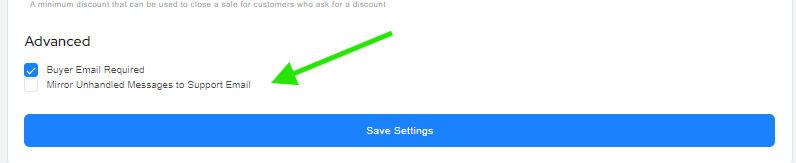
You can set up forwarding to your email for any unhandled messages by going to your: Settings > Brand Settings > Check: Mirror Unhandled Messages to Support Email
Your offers and site
You've decided on a continuous sale or separate Black Friday and Cyber Monday events
Discount codes are created, tested, and set to expire at the right time
Links in scheduled messages go to the right pages and load on mobile
No theme changes or page-speed apps are being installed during peak week
Your sends
Every peak week campaign is written and scheduled
Someone knows how to cancel a scheduled send if a code or link breaks
If you have any questions or issues, open a ticket right away with the campaign/automation name, or affected phone number if there is one, and a screenshot to expedite the support process.