July 2026 Product Release Notes
Last updated: August 10, 2026
Major Releases
Text to Subscribe
(Contact the Success Team to enable)
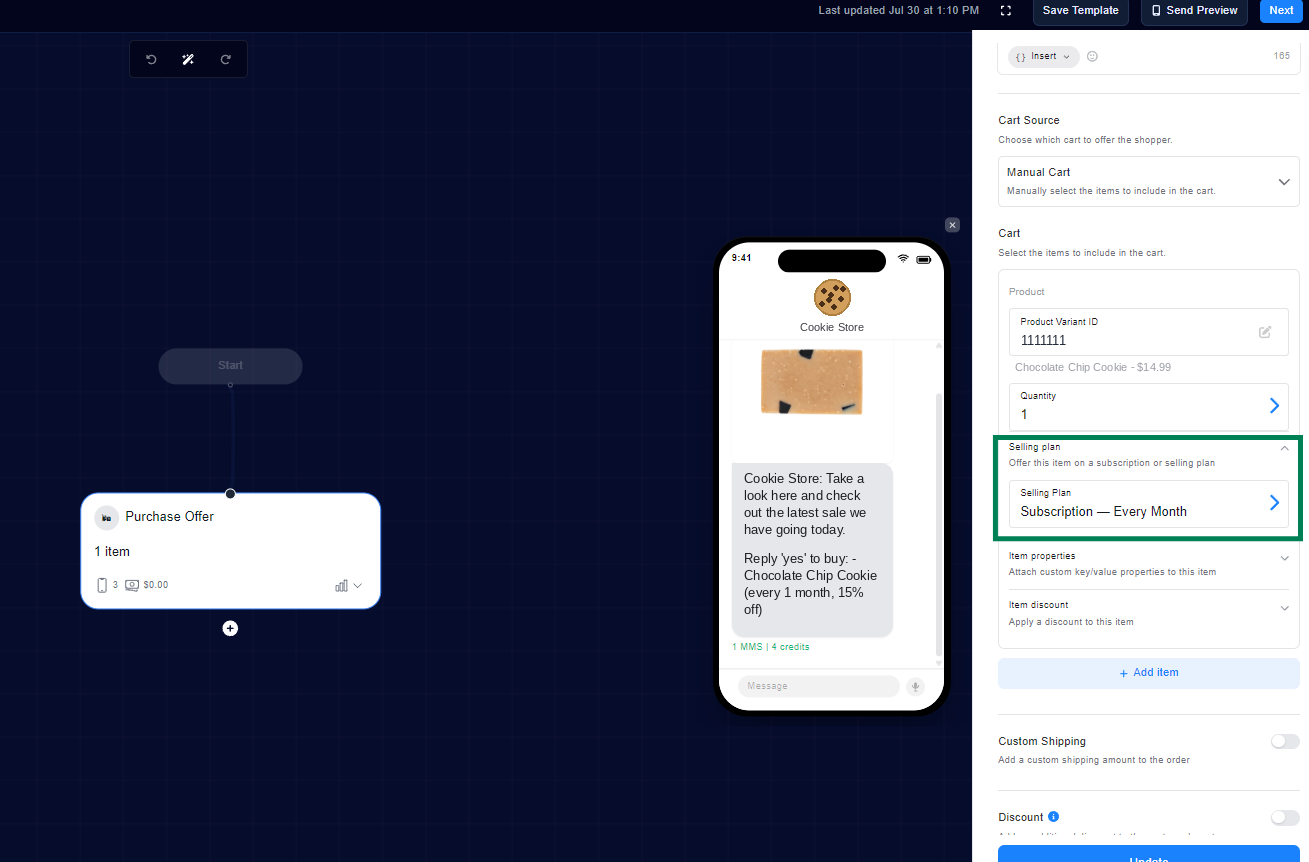
Customers can now set up recurring purchases with a single text reply — subscribing to specific products in your store on a preset cadence, with no portal, login, or checkout flow required.
What's New
Customers reply to a message to subscribe to eligible products on a recurring delivery schedule
Orders are placed automatically each cycle using the payment method on file, with a confirmation text before each charge
Customers manage their subscription entirely over text — skip, adjust, or cancel right in the same thread
Subscriptions only start with an explicit opt-in reply, keeping everything compliant
Why This Matters
Removes the biggest friction point in subscriptions — no app, portal, or password
Builds predictable recurring revenue from customers already engaged over SMS
Reach out to the Success team to see if this feature is a fit for your store
Can find more information here: https://docs.onetext.com/articles/1527784314-text-to-subscribe
Unique Discount Codes Per Customer
(Dashboard > Flow Editor > Discount Panel)
A new "Unique code per customer" toggle generates a fresh, single-use discount code for each shopper — so the code you text can't be reposted to coupon sites or shared around.
What's New
Enable the toggle in any discount step to mint a single-use code per recipient, cloned from your original discount
Works with Percentage and Amount discount types — enter a % or $ value directly, no Shopify discount code needed
The original shared discount stays intact; each customer simply gets their own copy that works once
Why This Matters
Stops discount codes from leaking to coupon sites
Same offer, protected margins — codes can't be passed around or reused
Less setup work: no need to pre-create codes in Shopify for percentage or amount discounts
RCS Message Editor Enhancements
(Dashboard > Flow Editor > Message Step)
Several upgrades to the RCS editing and preview experience give you more media options and a clearer picture of exactly what subscribers will receive.
What's New
Video and GIF support in RCS cards — the media URL field now accepts video and GIF links, with inline rendering in the phone preview
RCS / SMS fallback preview toggle — flip between the rich RCS card and the plain SMS fallback to see how your message renders on each channel
Preview now reflects your effective RCS conversion settings, so what you see matches what subscribers receive
Why This Matters
Richer, more engaging RCS content with video and GIF media
Full confidence in how messages appear across RCS and SMS devices before sending
Safer campaign reviews with true read-only viewing
Named API Keys for Integrations
(Settings > API Credentials)
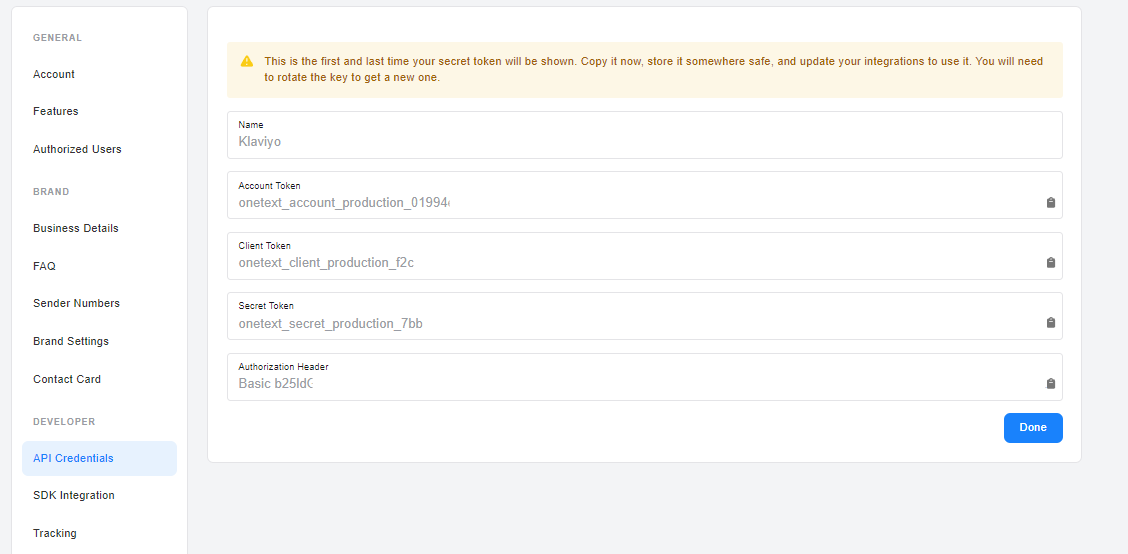
You can now create up to 10 named API keys per account and manage each one independently — giving every integration its own credential.
What's New
Create up to 10 API keys, each with its own name (e.g. "Zapier", "internal script")
Rotate or delete any key on its own without touching the others
Connecting Klaviyo now automatically creates its own dedicated key, which appears in your API Credentials list
Why This Matters
Shut off a single integration if needed instead of rotating one shared key and breaking everything
Clearer visibility into what each credential is used for
Better security hygiene with isolated, individually managed keys
Minor Releases
Support Moved to the Sidebar
Support chat now lives in a "Support" link at the bottom of the left sidebar instead of a floating chat bubble, so it no longer blocks buttons or content in the corner of the page.
Subscriber Opt-Out Webhooks
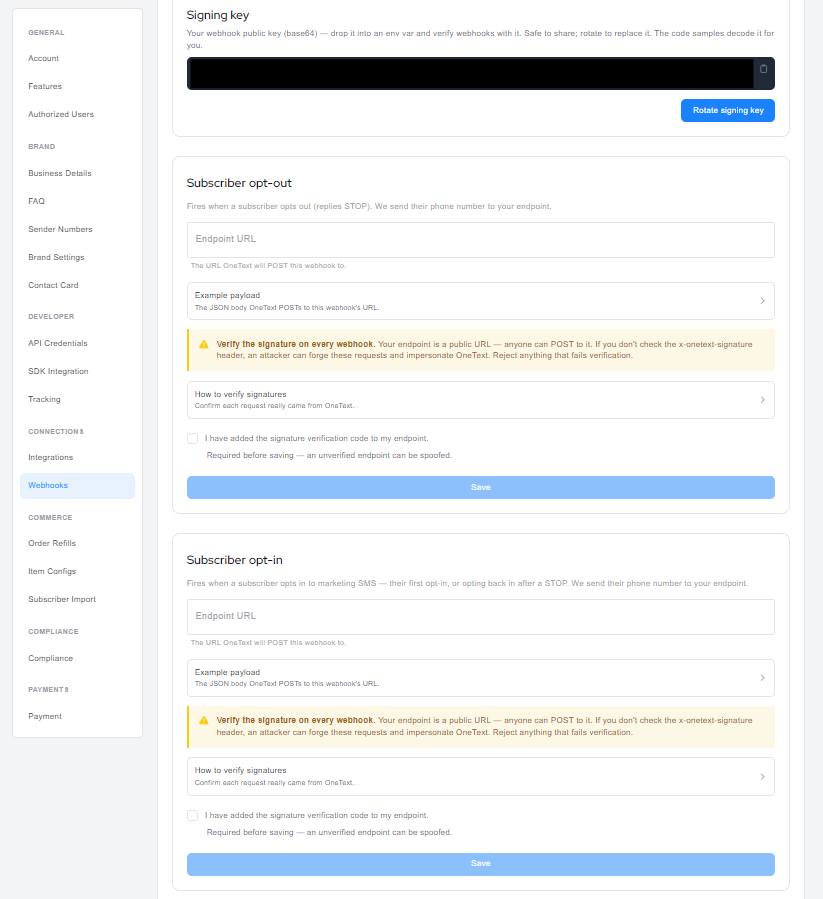
Configure a webhook URL (Settings > Webhooks) that fires whenever a contact opts in or out — useful for keeping your CRM or compliance systems in sync. Signed payloads include instructions for verifying the signature header.
Automatic Discounts for Selling Plan Carts
Merchants with selling plans enabled can now use automatic discounts in flows — previously these carts were limited to code-type discounts only.
Redesigned Date & Time Picker
The dashboard date picker has been rebuilt with a cleaner calendar grid, time slot selection, and range presets. You'll see the updated picker anywhere date/time inputs appear.
Message Preview Fix for AI Copy
Fixed an issue where AI-generated copy was missing from message previews in Product Choice and Purchase Offer steps when using prompt mode — previews now render the copy alongside the product images.
RCS Duplicate Button Fix
Purchase Offer and Product Choice messages sent over RCS no longer receive an auto-generated "Browse Now" button alongside the inline cart link, eliminating the duplicate call-to-action.
Monthly Invoice Clarity
Invoice messages now show Total, Paid, and Amount Due separately instead of labeling the outstanding balance as "Total." When nothing is owed, the payment link is omitted.
General Bug Fixes & Backend Improvements
Various fixes and backend updates to improve platform stability and performance, plus dashboard menu cleanup and several UI/UX improvements.